
Notice
Recent Posts
Recent Comments
Link
| 일 | 월 | 화 | 수 | 목 | 금 | 토 |
|---|---|---|---|---|---|---|
| 1 | 2 | |||||
| 3 | 4 | 5 | 6 | 7 | 8 | 9 |
| 10 | 11 | 12 | 13 | 14 | 15 | 16 |
| 17 | 18 | 19 | 20 | 21 | 22 | 23 |
| 24 | 25 | 26 | 27 | 28 | 29 | 30 |
| 31 |
Tags
- 탐색기법
- 개발자
- 프로그래밍
- 언리얼
- 자료구조
- 오늘의에러
- 재귀함수
- 코딩테스트
- 연산자오버로딩
- c++자료구조
- 코딩
- 미라클모닝
- 백준
- 구조체포인터
- UE5
- 게임개발
- 커스텀로그
- fstring
- 구조체
- 게임프로그래밍
- 언리얼로그
- unreal
- dfs
- 링크드리스트
- C++
- 내가해냄
- permutation
- 개발
- 얌얌코딩
- TPS
Archives
- Today
- Total
All is well
[UE5/TPS/Proto03] Player Input Binding 본문
02) Player - Enhanced Input 방식을 이용한 회전 Input 관련 세팅
- Unreal Editor 실행
- 이니셜 폴더 안에 Inputs 폴더 생성
- RMB 클릭 → Input Action 추가 → IA_LookUp 으로 이름 변경
- Value Type을 Axis 1D로 설정 후 저장
- RMB 클릭 → Input Action 추가 → IA_LookUp 으로 이름 변경
- Value Type을 Axis 1D로 설정 후 저장IA 추가
- Value Type : input이 들어왔을때 어떤 데이터 타입으로 결과를 받을 것인지 선택하는 것
- IMC_TPS 추가
- RMB 클릭 → Input Mapping Context 추가 → IMC_TPS로 이름 변경
- Mappings에 IA_LookUp, IA_Turn 추가

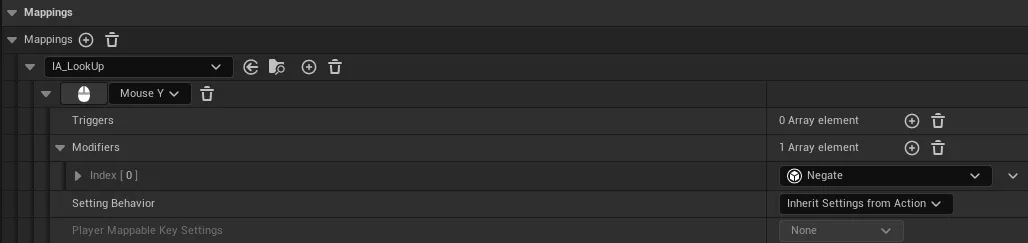
- 마우스를 위아래로 움직여서 input을 받을 예정이라 Mouse Y
- 이때 받는 값은 Z축 값
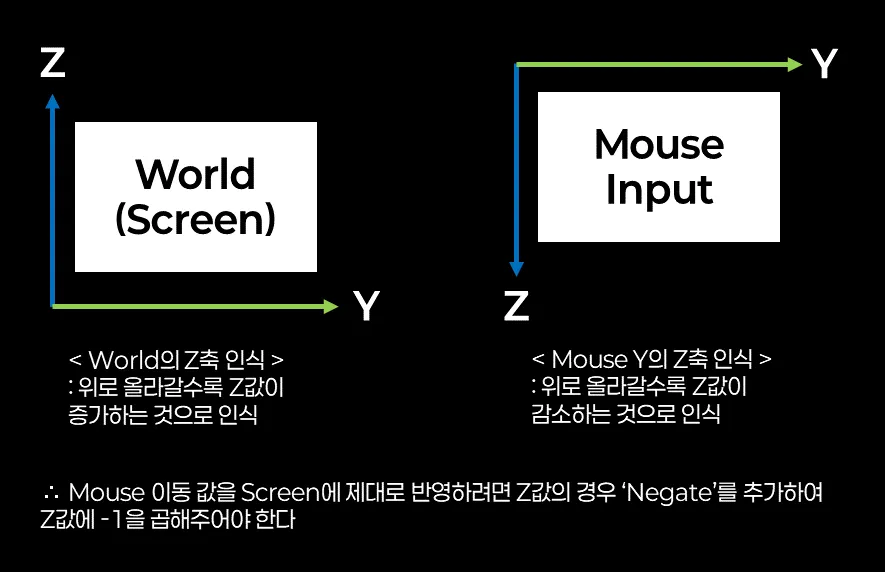
- Modifiers 추가 → Negate 추가(: 기존 input값에 -1을 곱해서 받겠다)
cf) Negate를 추가하는 이유
03) Player - CPP에서 회전 Input Binding 및 Input 함수 구현
- `TPSPlayer.h`에 Input Mapping Context, Input Action 관련 변수 생성
- `TPSPlayer.h`에 Input 처리할 함수들 생성
- `TPSPlayer.cpp`의 `SetupPlayerInputComponent()` 에서 Enhanced input Binding 실행
- `TPSPlayer.cpp`에서 Input 처리할 함수들 정의
- `TPSPlayer.cpp`의 `BeginPlay()`에서 Enhanced Input 이용을 위한 처리
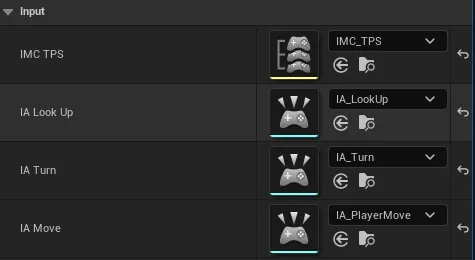
- BP_TPSPlayer에서 Input 넣어주기

Player - Enhanced Input 방식을 이용한 이동 Input 관련 세팅
- IA 추가
- RMB 클릭 → Input Action 추가 → IA_PlayerMove 으로 이름 변경
- Value Type을 Axis 2D로 설정 후 저장
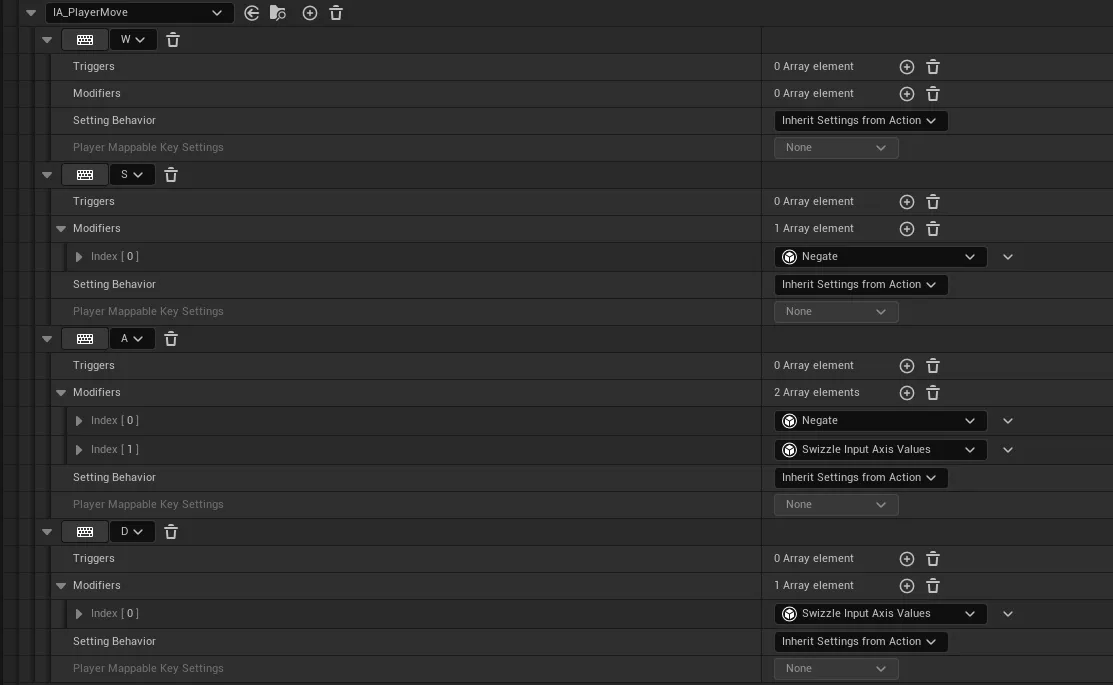
- IMC_TPS 에 IA_PlayerMove 추가
05) Player - CPP에서 이동 Input Binding 및 Input 함수 구현
- `TPSPlayer.h`에 관련 변수 추가
- `TPSPlayer.h`에 Input 처리할 함수들 생성
- `TPSPlayer.cpp`의 `SetupPlayerInputComponent()` 에서 Enhanced input Binding 실행
- `TPSPlayer.cpp`에 관련 함수 정의
- `TPSPlayer.cpp`의 `Tick()`에서 이동 구현
- BP_TPSPlayer에서 Input 넣어주기
Player - Enhanced Input 방식을 이용한 점프 Input 관련 세팅
- IA 추가
- RMB 클릭 → Input Action 추가 → IA_PlayerJump 으로 이름 변경
- Value Type을 Digital로 설정 후 저장
- IMC_TPS 에 IA_PlayerJump 추가

Player - CPP에서 점프 Input Binding 및 Input 함수 구현
- `TPSPlayer.h`에 관련 변수 추가
- `TPSPlayer.h`에 관련 함수 선언
- `TPSPlayer.cpp`의 `SetupPlayerInputComponent()` 에서 Enhanced input Binding 실행
- `TPSPlayer.cpp`에 관련 함수 정의
- `BP_TPSPlayer`에서 Input 넣어주기
cf) 2단 점프 : `JumpMaxCount` 변수 이용

< .h >
// TPSPlayer.h

UCLASS()
class TPSPROJECT_API ATPSPlayer : public ACharacter
{
	GENERATED_BODY()

	/***** Input - 250204 *****/
public:
    UPROPERTY( EditDefaultsOnly , Category = "Input" )
	class UInputMappingContext* IMC_TPS;
	UPROPERTY( EditDefaultsOnly , Category = "Input" )
	class UInputAction* IA_LookUp;
	UPROPERTY( EditDefaultsOnly , Category = "Input" )
	class UInputAction* IA_Turn;

	void Turn(const FInputActionValue& inputValue);		// 좌우 회전 입력 처리
	void LookUp(const FInputActionValue& inputValue);	// 상하 회전 입력 처리


	/***** 사용자의 좌우 입력을 받아서 이동하고 싶다 - 250204 *****/
public:
	UPROPERTY( EditDefaultsOnly , Category = "Input" )
	class UInputAction* IA_Move;
    UPROPERTY( EditAnywhere , Category = "PlayerSetting" )
	float WalkSpeed = 600.f;	// 이동 속도
	FVector Direction;			// 이동 방향

	void Move(const FInputActionValue& inputValue);


	/****** 사용자의 스페이스바 입력을 받아서 점프하고 싶다 - 250204 *****/
	UPROPERTY( EditDefaultsOnly , Category = "Input" )
	class UInputAction* IA_Jump;

	void InputJump(const FInputActionValue& inputValue);
};
< .cpp > - `SetupPlayerInputComponent()`
// TPSPlayer.cpp

void ATPSPlayer::SetupPlayerInputComponent(UInputComponent* PlayerInputComponent)
{
	Super::SetupPlayerInputComponent(PlayerInputComponent);

	/***** Input Binding - 250204 *****/
	auto PlayerInput = Cast<UEnhancedInputComponent>( PlayerInputComponent );
	if (PlayerInput)
	{
		PlayerInput->BindAction( IA_Turn, ETriggerEvent::Triggered, this, &ATPSPlayer::Turn );
		PlayerInput->BindAction( IA_LookUp, ETriggerEvent::Triggered, this, &ATPSPlayer::LookUp );
		PlayerInput->BindAction( IA_Move, ETriggerEvent::Triggered, this, &ATPSPlayer::Move );
		PlayerInput->BindAction( IA_Jump, ETriggerEvent::Started, this, &ATPSPlayer::InputJump);
	}
}
< .cpp > - 관련 함수 정의
// TPSPlayer.cpp

void ATPSPlayer::Turn( const FInputActionValue& inputValue )
{
	AddControllerYawInput( inputValue.Get<float>() );
}

void ATPSPlayer::LookUp( const FInputActionValue& inputValue )
{
	AddControllerPitchInput( inputValue.Get<float>() );
}

void ATPSPlayer::Move( const FInputActionValue& inputValue )
{
	FVector2D value = inputValue.Get<FVector2D>();

	// 상하 입력 처리
	Direction.X = value.X;

	// 좌우 입력 처리
	Direction.Y = value.Y;

}

void ATPSPlayer::InputJump( const FInputActionValue& inputValue )
{
	Jump();
}
< .cpp > - `Tick()` 에서 Player 이동 방법 1 : P = P0 + vt
// TPSPlayer.cpp

void ATPSPlayer::Tick(float DeltaTime)
{
	Super::Tick(DeltaTime);

	/***** Player 이동 - 250204 *****/

	/* 방법1 : P(결과 위치) = P0(현재 위치) + v(속도) * t(시간) */
	Direction = FTransform(GetControlRotation()).TransformVector( Direction );	// Input으로 받은 Dir에 Controller의 방향을 반영함
	FVector P0 = GetActorLocation();

	FVector vt = Direction.GetSafeNormal() * WalkSpeed * DeltaTime;

	FVector P = P0 + vt;
	SetActorLocation(P);
}
< .cpp > - `Tick()` 에서 Player 이동 방법 2 : `AddMovementInput()` 이용
void ATPSPlayer::Tick(float DeltaTime)
{
	Super::Tick(DeltaTime);

	/***** Player 이동 - 250204 *****/

	/* 방법2 : AddMovementInput() 이용 */
	AddMovementInput( Direction );	// 내부적으로 Direction에 Normalize 적용

	Direction = FVector::ZeroVector;	// 적용 후 초기화
}'UE > TPS' 카테고리의 다른 글
| [UE5/TPS/Proto04] Bullet 구현 (0) | 2025.02.12 |
|---|---|
| [UE5/TPS/Proto02] Player 생성 / Camera 셋팅 (0) | 2025.02.09 |
| [UE5/TPS/Proto01] Project File 생성 / Custom log 생성 (0) | 2025.02.08 |
'UE/TPS' Related Articles
more


